
What to Look for in an AI Interior Design Tool
June 9, 2026 · 7 min read · VisualizeAI Team
The market for AI interior design tools has grown fast. A category that barely existed three years ago now has dozens of options — each promising photorealistic results, instant transformations, and design skills you don't need to have.
Most of them don't deliver on all three.
Choosing the wrong tool means wasted money, underwhelming results, and — for designers and real estate professionals — potentially unusable renders that can't legally be used in client work.
This guide covers the six things that actually separate a genuinely useful AI interior design tool from one that looks good in a demo but disappoints in practice.
1. Photorealism — The Only Output That Matters
The entire value of an AI interior design tool is the quality of its output. If the render doesn't look like a real photograph of a redesigned room, it's not useful.
This sounds obvious, but it's where the widest variation between tools exists. Some produce results that are photographic, detailed, and true to your room's actual proportions and lighting. Others produce stylised illustrations, blurry approximations, or distorted spaces that bear little resemblance to the room you uploaded.
The difference matters practically. A low-quality render is useless for making design decisions — you can't tell whether the japandi palette actually works in your north-facing bedroom from a blurry, over-saturated image. A photorealistic render lets you evaluate the result as if you're looking at a real photograph.
What to check:Before committing to any tool, run a test on a room you know well. Does the result preserve your room's actual proportions? Does the lighting match the photo you uploaded? Are the textures — fabric, wood grain, stone — rendered in detail? Can you see the quality clearly, or is the output soft and indistinct?
A tool that produces photorealistic results on familiar spaces is one you can trust on unfamiliar ones.

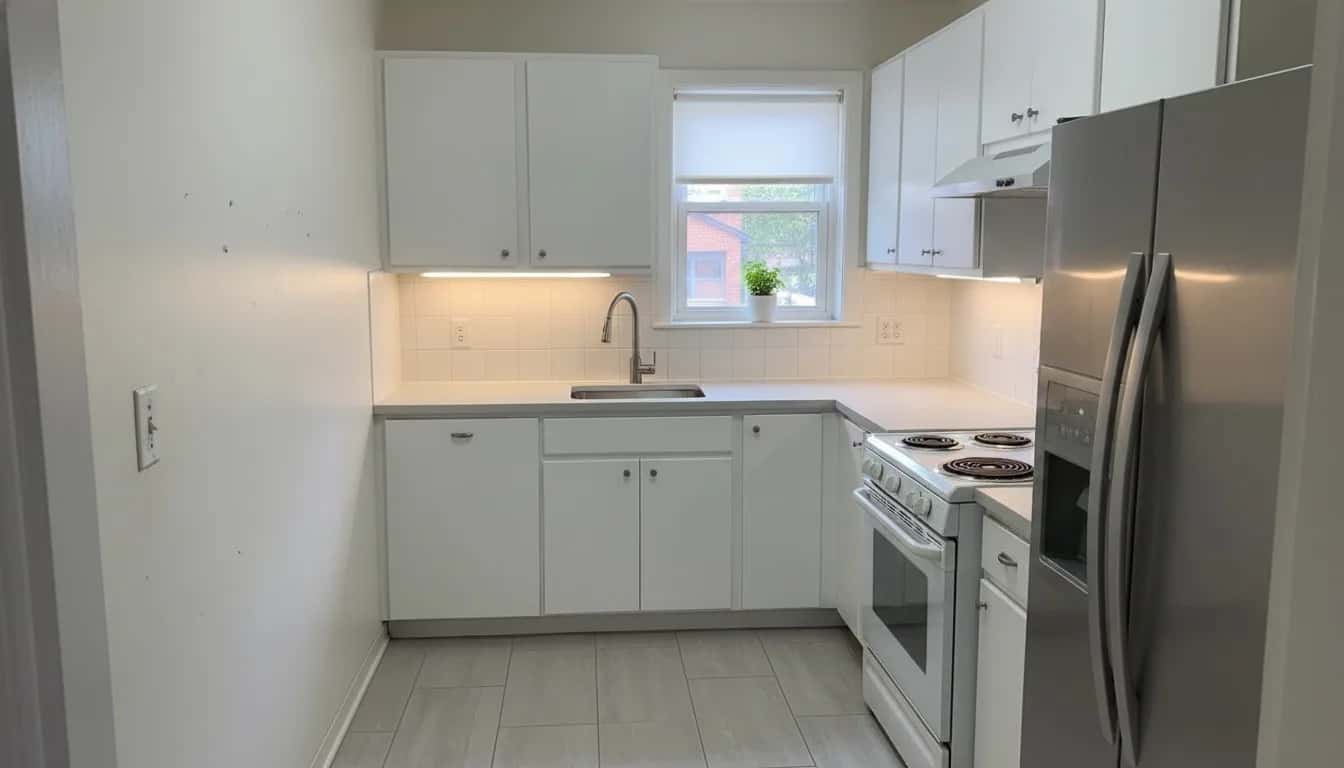
Photorealism in practice: drag to compare a VisualizeAI kitchen render.
2. Style Range — Breadth Enables Discovery
Interior design is personal. The style that looks perfect in a Pinterest photo of someone else's home may look completely wrong in yours. The only way to find out is to try several directions — which means the tool needs to support several directions.
A tool with five or six style options forces you into a narrow range of outcomes. You may not love any of them. A tool with 30 or more styles — covering everything from japandi and boho to art deco, cottagecore, biophilic, dark moody, and brutalist — gives you the breadth to actually discover what fits your space.
Breadth also matters because design taste evolves. The style you're drawn to today may be different from what you want in a year. A tool with a wide style range stays useful across projects and evolves with you.
What to check:Look for consistency across styles, not just quantity. A tool that does modern well but produces weak results for boho or mid-century modern isn't as useful as one that delivers quality consistently across the full range. Test two or three very different styles on the same room to evaluate consistency.
VisualizeAI supports 30+ interior design styles — browse them all.
3. Speed — Iteration Is the Product
AI interior design tools are most valuable when you use them iteratively — trying japandi, then boho, then mid-century modern on the same room, comparing the results, and narrowing down what you love.
If each render takes five minutes, you'll try two or three styles and settle. If each render takes seconds, you'll try ten, compare freely, and make a more confident decision.
Speed isn't a convenience feature — it directly determines how useful the tool is for exploration. A slow tool discourages iteration. A fast tool makes iteration effortless.
This matters even more for professional use. An interior designer presenting multiple style directions to a client in real time needs results in seconds, not minutes. A real estate agent generating virtual staging renders for a new listing needs to turn around results quickly.
What to check: Time the render process from upload to result during your free trial. Anything under 30 seconds is good. Anything over two minutes will frustrate you quickly in regular use.
4. Commercial Use Rights — Read Before You Share
This is the most overlooked factor — and the most consequential for professional users.
AI-generated images are a new category of creative output and terms of service vary widely between tools. Some explicitly grant commercial use rights on all plans. Some restrict commercial use to higher-priced tiers. Some don't address it clearly at all, leaving you in legally ambiguous territory if you use a render in a listing, a client presentation, or a marketing campaign.
If you're a homeowner using renders purely for personal decision-making, this matters less. If you're an interior designer, real estate agent, property stager, or developer using renders in any professional context, it matters enormously.
Using renders in a commercial context without the explicit right to do so is a liability — regardless of how useful the output is.
What to check: Read the terms of service before paying for any plan. Look specifically for language about commercial use, ownership of generated images, and whether the provider retains any rights to outputs. The best tools make this unambiguous.
VisualizeAI includes full commercial use rights on both the Basic ($19.99/month) and Pro ($24.99/month) plans. No ambiguity, no additional licensing required.
5. Room Type Coverage — Not Just Living Rooms
Some AI interior design tools are trained primarily on living rooms. They produce strong results for a sofa-and-coffee-table arrangement but struggle with kitchens, bathrooms, awkward angles, or outdoor spaces.
If you only ever need living room redesigns, this isn't a problem. But if you want to redesign a kitchen, visualise a bathroom renovation, explore a home office layout, or see what your garden could look like after a landscaping project — you need a tool that handles all of those well.
What to check: Test the tool on the specific room types you care about. Run a kitchen photo and a bedroom photo alongside a living room photo. Compare quality across room types before committing to a paid plan.
VisualizeAI supports all room types: living rooms, bedrooms, kitchens, bathrooms, home offices, gardens, patios, and outdoor spaces — all with the same style range and render quality. Try our room visualizer on any space.
6. Pricing That Matches Your Actual Usage
AI interior design tools are priced on a spectrum — from free tiers with very limited monthly renders to subscription plans with hundreds or thousands of renders per month.
The right plan depends entirely on how you use the tool.
A homeowner redesigning one or two rooms for a renovation project needs a modest render allowance — 50 to 150 renders is plenty to explore multiple styles across several rooms. A professional generating renders for multiple clients simultaneously needs volume — 500 to 1,000 renders per month or more.
Watch for two common pricing traps. First, tools with enticing free tiers that throttle renders so aggressively you can't actually evaluate the product fairly. Second, tools that charge per render with no cap, which makes costs unpredictable if you're iterating heavily.
Flat monthly subscriptions with a generous render allowance are the most predictable and practical for regular use.
What to check:Calculate roughly how many renders you'll need per month. A single room explored across 10 styles = 10 renders. Five rooms across 5 styles each = 25 renders. Add buffer for revisions and you have a working monthly estimate. Then check whether the plan's render allowance actually covers that comfortably.
VisualizeAI's Basic plan ($19.99/month, 150 renders) covers most homeowner and light professional use. The Pro plan ($24.99/month, 1,000 renders) is built for active design and real estate professionals.
The Six Things That Actually Matter
- ✓Photorealism — does it look like a real photograph of your actual room?
- ✓Style range — does it cover the full breadth of design aesthetics, consistently?
- ✓Speed— does it produce results in seconds, enabling free iteration?
- ✓Commercial use rights — are they explicitly included, without ambiguity?
- ✓Room type coverage — does it handle every room you need, not just living rooms?
- ✓Pricing— does the plan's render volume match your actual usage pattern?
A tool that scores well on all six is one you can rely on for both personal and professional projects. A tool that scores poorly on even one — especially photorealism or commercial use — will disappoint in practice.
See the Difference for Yourself
The best way to evaluate any AI interior design tool is to run it on a room you know. Upload a photo of your space, choose a style you're curious about, and judge the result against these six criteria.
VisualizeAI offers a free trial — no credit card required. You'll have enough renders to test photorealism across multiple styles and room types before deciding whether to upgrade.
If the quality speaks for itself, great. If it doesn't, you haven't spent anything finding out.
No credit card required. Free renders included.